Congrats on being referred to CourseCareers! Find your next career path now with no upfront cost.

100% Scholarships Available. Open to Everyone.
Learn More
Updated October 25, 2026
There are three main reasons you may see the Purchase Course button instead of the Continue Course button.
Sign in and go to My Course
If you have more than one career path, select the one you want.
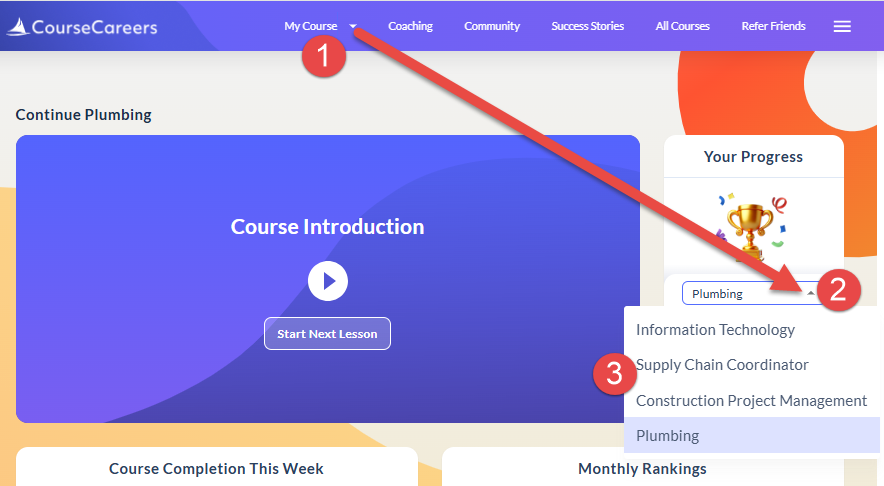
You may need to refresh your browser page if it doesn't change to the selected course automatically.
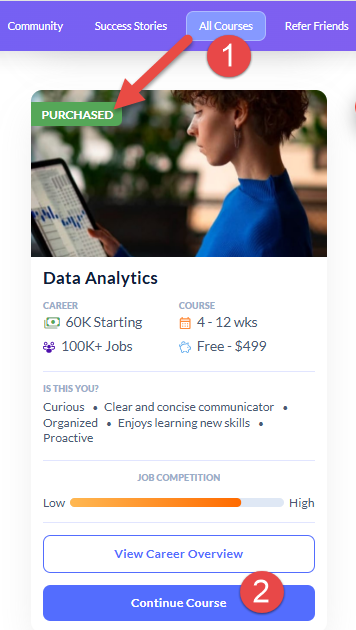
Click All Courses in the top navigation bar. This will take you to the Explore Career Paths page.
Find your career path/course. It should say PURCHASED with a Continue Course button. Click the Continue Course button, and that should take you to your course.
Usually it is one of the issues above, but if none of them apply to you, you can try the following:
Ask our support assistant. It can answer most questions right away, and it hands you to our team when it cannot.
Or email support@coursecareers.com (Mon-Fri, 8 am – 5 pm EST).